Unity Integration 2.02
1. Welcome to FMOD for Unity | New in FMOD for Unity 2.00
What's New in 2.00?
This section describes the major features introduced in the 2.00 release. See the Detailed Revision History for information regarding each patch release.
General runtime features and improvements, including any API changes relevant to scripting are documented in the API what's new page.
Global Parameters
The Studio API now supports global parameters. These parameters are controlled via the System parameter API and have a single value that is shared between all instances.
See the Global Parameters chapter of the FMOD API User Manual for more information.
A new component has been added to the integration, StudioGlobalParameterTrigger, this allows you to set a global parameters value upon triggering a Unity event.

An attribute, [FMODUnity.ParamRef], has also been added to assist with picking Global Parameters in custom scripts. See the Scripting API Reference for more information.
Sample Data Encryption
Bank sample data can now be encrypted using FMOD Studio. This implementation is an extension of the Core API FSB encryption feature.
To allow bank loading when used with the Studio API, set the key via FMOD_STUDIO_ADVANCEDSETTINGS::encryptionkey. When some banks are unencrypted you can use the FMOD_STUDIO_LOAD_BANK_UNENCRYPTED load flag to ignore the given key.
The FMOD for Unity settings now have an added field for bank loading, Bank Encryption Key.
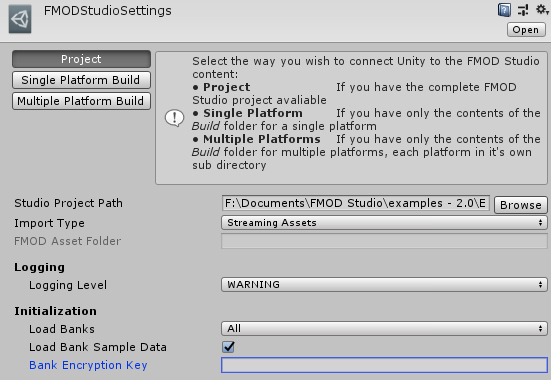
See the Sample Data Encryption chapter of the FMOD API User Manual for more information.
Nintendo Switch Platform Settings
Previously the Nintendo Switch used the same FMOD Platform settings as Mobile, now it has its own category under Console. The first time the settings are opened, any settings in Mobile will be copied over to the Switch settings.

Integration Folder Structure
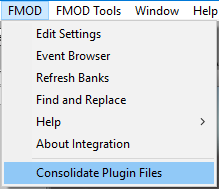
The folder structure of the Integration has been reorganized to be neater and more compact. You can use the option in 'FMOD > Consolidate Plugin Files' (after importing the new package) to move all the plugin files to the new folder layout.
Upgrading from 1.10
Upgrading from 1.10 to 2.00 will cause compilation errors until you complete the manual upgrade steps.